

What is Git?
Git is a locally installed software tool that supports developers to track changes to code. It is a version control system that allows the management of development for both individual developers and teams. No more copying your source files and maintaining manual backups! With Git developers can:
- Add files to a project called a “repository”
- Maintain a log of changes to files in snapshots called “commits”
- Build software in “branches” of commits, the tip of the branch recording the current state of the files in the repository for the selected branch
- Rewind the state of files to earlier commits on any branch
- Manage multiple branches simultaneously
- Merge branches easily, automatically resolving any conflicts between code changes on them
- Tag commits to label them allowing easy reference to snapshots of your code for publication or deployment
What is GitHub?
GitHub is a code management, collaboration and automation platform offered as a web-based hosting service. It incorporates all the core features of Git via the web browser while enabling developers to host repositories on GitHub servers that can be shared publicly or privately. This facilitates collaboration and efficient code management among software engineers wherever they are in the world. Key additional features include:
- Pull Request Reviews: When merging branches, GitHub can provide an environment for other people to review your changes and comment as appropriate, enabling peer review and safe merging of changes.
- Issues & Project Management: Track bugs, tasks, and enhancements, use project boards and labels to organise work.
- GitHub Actions (CI/CD): Automate workflows like testing, building, and deploying code. Supports custom scripts and reusable actions.
- Security & Compliance: Protected branches and tracking vulnerabilities in dependencies.
- Discussions & Wikis: Spaces for community Q&A and collaborative documentation.
- Codespaces: Cloud-based development environments that run in the browser.
What is GitHub Copilot?
GitHub Copilot is an AI-driven tool that can help write code by monitoring what is being written and drawing on source code from across GitHub to predict what to type next. You can also hold conversations with Copilot via the chat interface. It can be used directly from within Integrated Development Environments (IDE) such as Visual Studio, Eclipse, PyCharm and Visual Studio Code to provide real-time suggestions. Users can also ask GitHub Copilot to write code based on a direct prompt e.g. “Write a unit test for this function”.
GitHub Copilot licensing changed significantly in 2026. GitHub now offers separate plans for individuals, students and organisations. There are currently seven tiers: Copilot Free, Copilot Student, Copilot Pro, Copilot Pro+, Copilot Max, Copilot Business and Copilot Enterprise. The previous idea of “standard” and “premium” requests, where the latter was limited based on tier, has largely been replaced by a GitHub AI Credit-based model. Chat messages, agentic coding workflow execution, code review and other AI-driven interactions consume these credits instead. The amount of credit used is based on token usage. Inline code completions and next-edit suggestions within IDEs remain included on paid plans and do not consume AI Credits.
For University of Manchester users, verified students are eligible for the GitHub Copilot Student plan, while verified educators (in practice any University staff) are eligible for the Copilot Pro plan. Although we have a University of Manchester Enterprise account through our Campus Programme Membership, accessing Copilot through the enterprise would require licensing through Copilot Business or Copilot Enterprise as these are the relevant organisational licensing options. However, no part of that is free so it is disabled at the enterprise level and will remain so unless this changes.
Note: It is essential to verify AI outputs for accuracy, security, licensing compliance and efficiency.
GitHub Privacy Settings
As of March 2026, GitHub have changed their policy on how your interactions with GitHub Co-Pilot are used by them. By default you are opted-in to your interactions being used to train and improve their AI models. We recommend you do not allow this to minimise the risk of leaking anything in your code or your prompts to somewhere you didn't intend it to go. To opt-out, you must visit your GitHub Co-Pilot Privacy settings and disable this feature by clicking on your profile picture in the top right corner of the GitHub site.
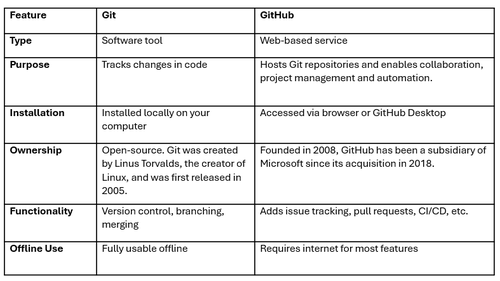
Git vs GitHub: Key Differences
Git and GitHub work together. Developers push code from Git to a “remote repository” that lives on GitHub servers to make it visible to others. Collaborators can view, comment and contribute via pull requests through the GitHub interface and any changes are “pulled” back into the developer’s local git repository – essentially keeping it in sync.
Access to GitHub Education Benefits
Although basic use of GitHub remains free, access to GitHub Pro, GitHub Copilot and enterprise features depends on the type of account and licence assigned. University staff and students are eligible for benefits through the GitHub Education programme as well as the University’s GitHub Enterprise arrangements given to us via our GitHub Campus programme membership. To access your benefits:
- Register a GitHub account if you don’t already have one.
- Turn on two-factor authentication on your GitHub account.
- Complete your billing information ensuring the name used matches the name on the ID you intend to use for verification of your educational benefits (likely your staff/student ID card). Note that optical character recognition will be used to read your ID card and it can have trouble with double-barrelled surnames so you may need to just use part of a surname here.
- Add your name to your GitHub user profile.
- Log out and re-log in to your account before proceeding to the next step.
- Go to the GitHub Education page and click “Join GitHub Education”.
- Select “Start an application for GitHub Education”.
- Indicate whether you are a staff member or student, and choose the University of Manchester as your institution.
- Use your @manchester.ac.uk email address as your school email.
- Click on “Share location”.
- When prompted, upload a photo of your University staff or student ID. This image will need to be of suitable quality to ensure the optical character recognition will work properly.
- Submit your application. It will be marked as pending while it is verified—this may take a few days.
Once approved, visit your GitHub Education portal to review the benefits available to you. Once redeemed, verified students and staff should expect to see GitHub Copilot Student and Pro respectively on the Copilot Settings page.
GitHub Enterprise Access
Through the University’s membership of the campus programme, we have a GitHub Enterprise account which allows:
- Creation of new GitHub organizations within the University’s GitHub Enterprise.
- Integration of existing organizations into the Enterprise.
- Membership allows access to a free pool of GitHub Actions’ minutes for your organization.
To request access or obtain support on GitHub organizations, contact the University’s GitHub Enterprise administrators in Research IT by raising a request via Connect.
Training and Support for Git
- Git training is available via a free course provided by Research IT.
- The Research Software Engineering team provides general support and assistance on all GitHub tools, please raise your enquiry using Connect.
- Our regular online Research IT drop-in sessions are a great channel for obtaining expert advice from experienced developers on all things research computing. Check our events page for details of the next session.
Ready to Get Started?
Whether you're building your first script or collaborating on a global research project, GitHub tools will help you code smarter, faster, and more securely. Remember if you have any questions after reading this guide, get in touch with our RSE team for more advice and guidance.
Don’t miss out—take advantage of the University’s free access today.